
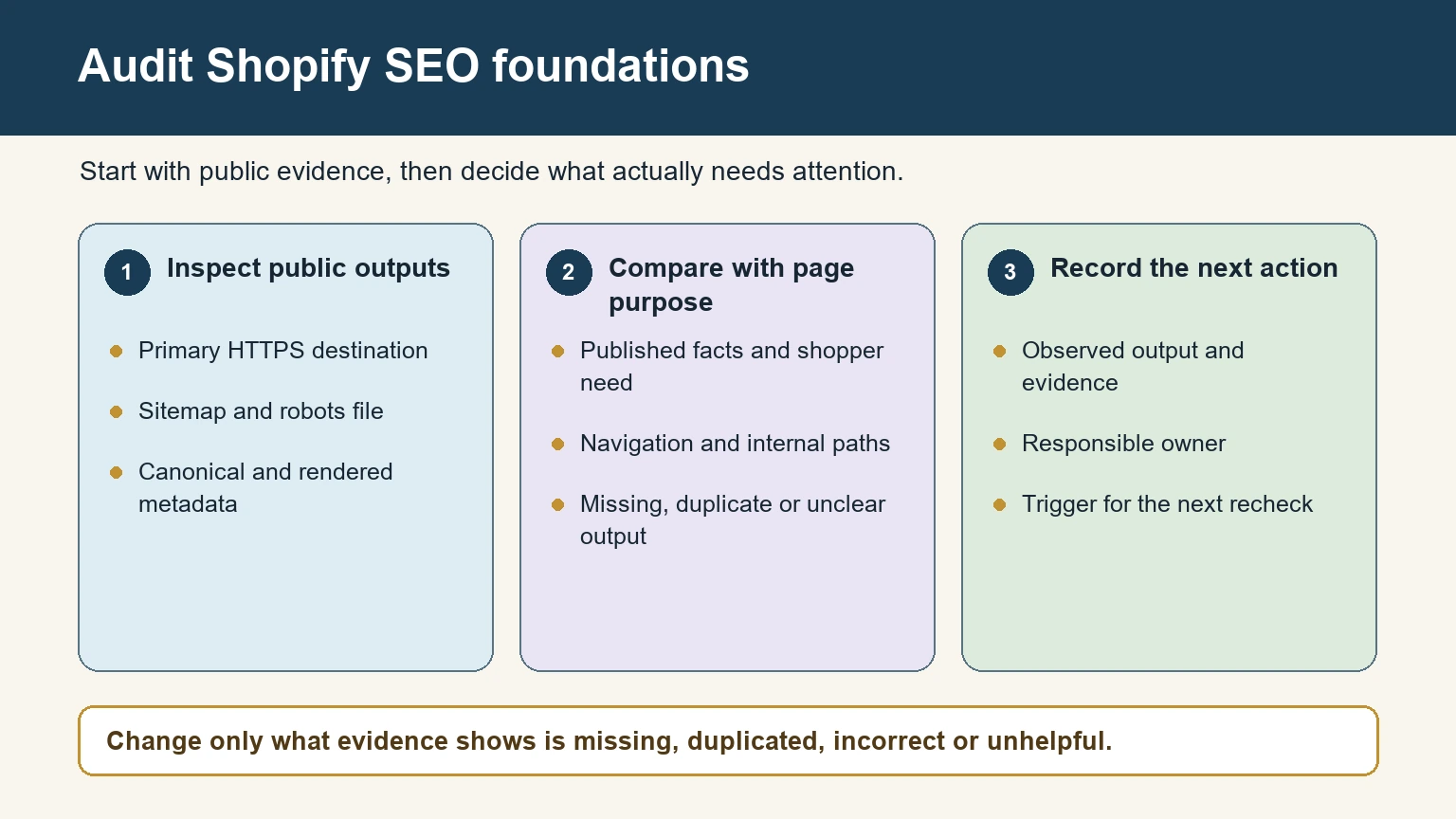
Shopify Online Store generates a sitemap and robots file, supports HTTPS, exposes a canonical URL value to themes, and provides fields for page titles, descriptions, URLs, and image alt text. Merchants still decide what each page is for, which facts it publishes, how shoppers reach it, and whether the final storefront output is correct.
Start by inspecting the public store, not by installing an app or editing Liquid. Shopify’s current SEO overview lists built-in outputs and editable fields. Use that list as a baseline, then investigate only the output that is missing, duplicated, incorrect, or unhelpful on the live page.
The useful division of responsibility
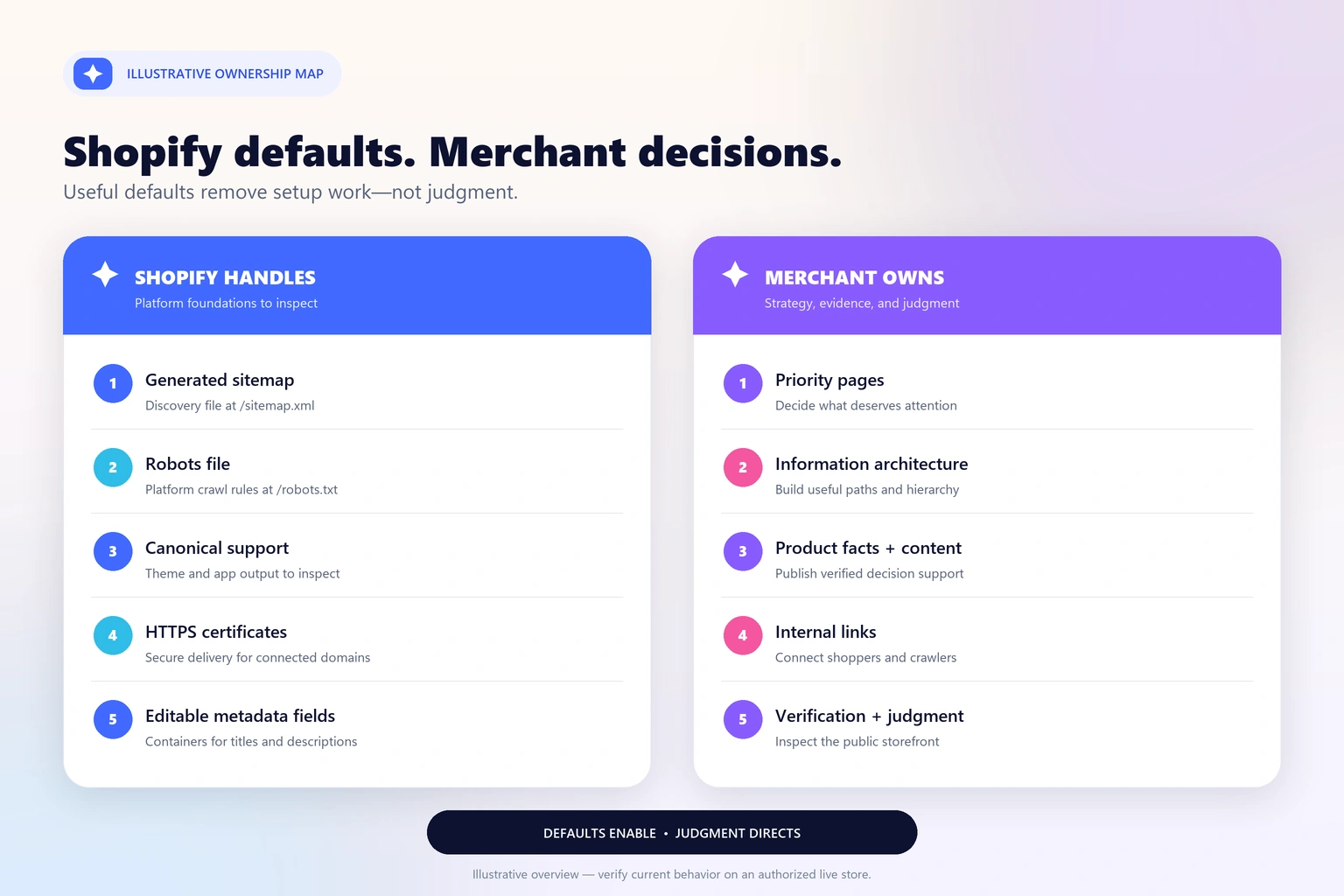
Platform output and merchant decisions solve different problems. A generated sitemap can expose URLs for discovery; it cannot decide whether a collection deserves to exist. A canonical value can identify a preferred URL; it cannot correct misleading internal links. A metadata field can hold a description; it cannot verify a product claim. Treat each automatic feature as an output to confirm, not as a completed strategy.
Choose a small public sample
- Access to the Shopify admin and permission to view products, collections, pages, blogs, navigation, themes, and domains.
- The store’s preferred public HTTPS domain.
- A short priority set: homepage, two collections, two products, one page, and one article.
- Google Search Console access if the property is already verified.
- A private browser window and at least one real mobile device for rendered checks.
Use the primary public HTTPS domain and review the store while logged out. Record the requested URL, final URL, response status, rendered page, and relevant source output. That evidence tells an editor, merchandiser, or developer what actually needs attention.
Verify the defaults before changing them
1. Confirm the primary HTTPS version
Open the preferred domain, then test common alternate hosts such as the www version and the store’s original myshopify.com address. They should lead shoppers consistently to the intended storefront. Shopify supplies SSL certificates for connected domains, but the merchant still owns domain selection, DNS correctness, and post-change verification.
2. Inspect the generated sitemap and robots file
Visit https://example.com/sitemap.xml and https://example.com/robots.txt, replacing the example domain. Shopify says its sitemap is generated at the domain root and links to separate files for products, collections, blogs, and pages. It updates as eligible resources are added. The official sitemap instructions also make an important distinction: submitting the file helps discovery, but crawling and indexing take time and are not guaranteed.
3. Verify the canonical URL on representative templates
View the rendered source for a product, collection, article, and page. Search for rel="canonical" and record the destination. Shopify exposes a global canonical_url Liquid object for the current page, and supported themes generally output it. The merchant still needs to notice app or theme customizations that create a second canonical, point to the wrong host, or omit it from a template.
4. Review editable metadata as editorial copy
Shopify provides title and meta-description fields; it cannot write the best promise for a particular page. For every priority URL, ask whether the title identifies the page, whether the description accurately previews it, and whether the visible heading supports the same topic. Avoid treating the preview as a guaranteed Google snippet: search engines may generate a different title or description for a particular query.
5. Make the hierarchy understandable through links
Menus, collection grids, breadcrumbs, editorial modules, and contextual copy show how the catalog fits together. The platform can render a menu you configure, but it cannot decide that a waterproof outerwear collection belongs in the main navigation or that a care guide should link to a fabric-specific product family. Important products should not depend on storefront search alone.
6. Replace generic product information with decision support
Product titles, media, variant names, descriptions, specifications, shipping context, and care instructions require source knowledge. A platform field is only a container. Write what a real buyer needs to compare options and verify every material, dimension, compatibility statement, and policy against business records. Do not copy a supplier paragraph across an entire catalog.
7. Measure outcomes and investigate exceptions
Use Google Search Console to inspect representative URLs, not to demand immediate indexing. Track which priority pages receive impressions, whether the intended canonical is selected, and whether important pages disappear after a theme or URL change. Separate an observed issue from a theory: “Google selected another canonical” is evidence; “Shopify canonicals never work” is an unsupported generalization.
| Check | Platform output to inspect | Merchant-owned decision | Completion evidence |
|---|---|---|---|
| Domain | HTTPS support | Preferred public host | Final URL and redirect trace |
| Discovery | sitemap.xml and robots.txt | Google Search Console property and monitoring | Accessible files and submission status |
| Duplicates | Canonical output | Consistent links and theme/app QA | One correct canonical per sample |
| Search presentation | Editable metadata fields | Accurate, useful copy | Admin value and rendered source |
| Structure | Menu and template system | Hierarchy and contextual links | Crawlable path to priority pages |
Example: a Trail Lanterns collection
Suppose example.com sells outdoor lighting. Shopify Online Store can publish a collection route, supply the current page’s canonical URL to the theme, serve the connected domain over HTTPS, and store editable search fields. The merchant decides whether “Trail Lanterns” is a useful category, chooses a stable handle such as /collections/trail-lanterns, links it from an appropriate menu, and describes brightness modes, battery types, weather resistance, and use cases from verified product records.
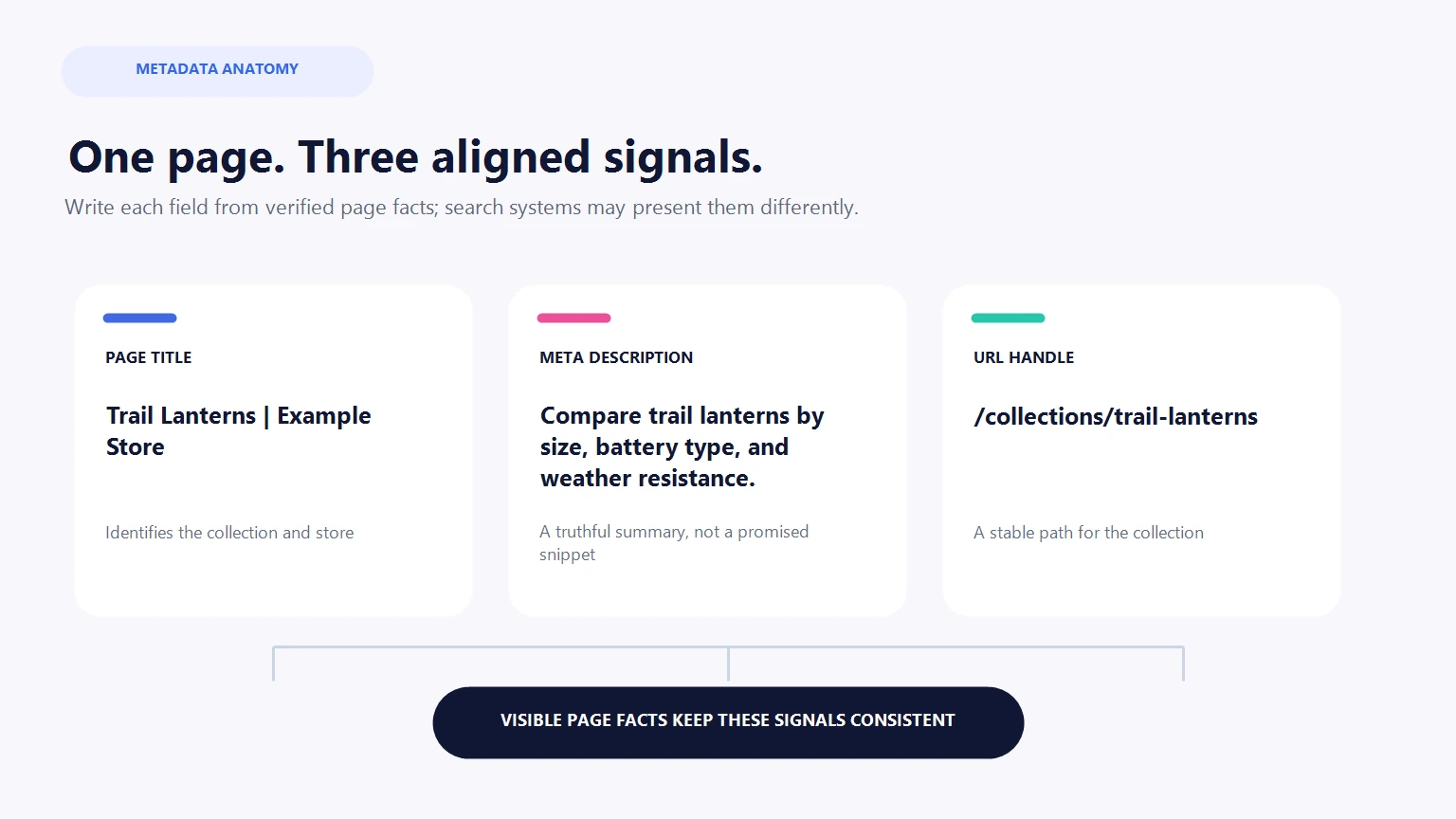
A reasonable title might identify the category and store name without repeating synonyms. The collection introduction can help a shopper distinguish a compact backpacking lantern from a larger campsite model. Relevant guides—such as a documented battery-care article—can link into the collection. None of this requires replacing Shopify’s sitemap or canonical system. It requires merchant knowledge and coherent publishing.
Check what shoppers and crawlers receive
- Open every priority page while logged out; confirm it does not require a preview token.
- Use the mobile menu to reach the same collection and product paths available on desktop.
- Check that the page has one clear visible heading and no theme element replaces it with a generic label.
- Confirm images have meaningful alt text when the image conveys information; leave decorative images appropriately empty.
- View rendered source for one canonical, a useful title, and no accidental
noindex. - Test links, sticky elements, consent banners, and expandable content with touch and keyboard input.
If customization is justified, preserve a rollback
If the audit uncovers a real exception that needs theme code, duplicate the current theme and record the original output first. Change one concern at a time, preview representative templates, and keep a reversal path. For metadata or navigation edits, export or record the current values. A rollback is not pessimism; it lets you distinguish the effect of one change from unrelated storefront activity.
Recheck after a dependency changes
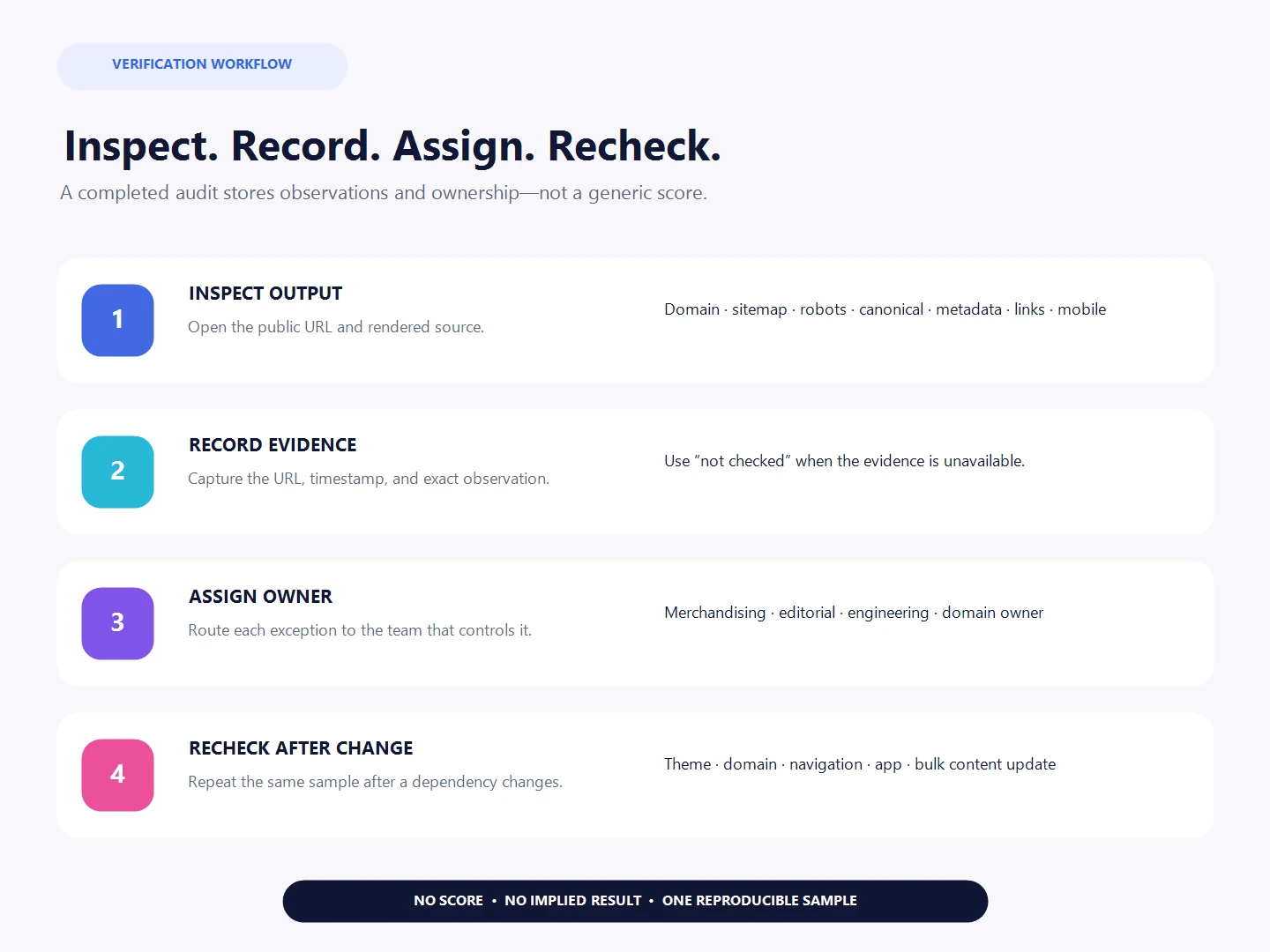
Automatic does not mean “never inspect again.” Review a small template sample after a theme publication, domain change, navigation restructure, app installation, or bulk content update. For routine catalog work, use a lighter cadence: confirm that one newly published product and collection enter the intended links and sitemap, carry the preferred host, and render the expected metadata. A consistent sample is easier to compare than a different improvised audit each month.
Assign every exception to a real owner. Merchandising can correct collection membership and product facts; editorial can improve titles, descriptions, and guides; engineering can investigate template output; the domain owner can address DNS and host routing. Avoid a generic “SEO” owner for work that requires another team’s access or source knowledge. Record the observed problem, proposed change, evidence required to close it, and rollback before implementation.
Reopen a passed item when its dependency changes. A canonical that was correct under one theme may be duplicated by a later app embed. A crawlable menu can become inaccessible after a mobile redesign. A useful product description can become inaccurate when materials or compatibility change. Maintenance is not repeated optimization for its own sake; it is a response to real changes in the store.
What a finished check records
For each sampled URL, record its purpose, owner, public status, canonical, metadata, crawlable inbound path, and unresolved exception. Use “not checked” when evidence is missing. Review Shopify resource paths separately before changing product, collection, page, or article handles.